
TL;DR:
- Using shareable link tools streamlines Secret Santa organization by eliminating email dependency and reducing setup time. These platforms improve participation rates, protect privacy, and simplify assignment distribution, especially for remote or workplace groups. Selecting a no-email generator fosters fun, spontaneous exchanges by minimizing friction and ensuring everyone stays engaged.
Running a Secret Santa exchange sounds simple until you're three days in, chasing down coworkers who never got their invite, watching perfectly timed emails disappear into spam folders, and fielding questions about who has whom. Email-based tools were built for a different era. Today's teams, especially remote ones, need something faster, more private, and frankly less annoying. No-email Secret Santa generators solve all of this by replacing inbox chaos with shareable links that work instantly, for any group size, with zero account creation required.
Table of Contents
- What you need to organize a Secret Santa without email
- Step-by-step: Using a Secret Santa generator without email
- Troubleshooting and common mistakes in no-email Secret Santa setup
- Comparing no-email Secret Santa generators: Which is best?
- What most Secret Santa guides miss: The real advantage of no-email generators
- Start your stress-free Secret Santa today
- Frequently asked questions
Key Takeaways
| Point | Details |
|---|---|
| No-email Secret Santa tools | Tools like drawnames and Uplup offer fast, private gift exchanges without email hassles. |
| Step-by-step setup | Organizing a gift exchange is easy with shareable links—no email collection required. |
| Avoid common errors | Link sharing and privacy are simple to manage if you follow best practices for group setups. |
| Choose your platform wisely | Compare options for features, privacy, and user-friendliness to find the right fit for your team or friends. |
What you need to organize a Secret Santa without email
Now that you know the challenges, let's look at what you'll need to start a hassle-free Secret Santa exchange.
The good news is that the barrier to entry is low. You don't need a company email list, IT approval, or a paid subscription. Here's what you actually need to get started:
- A complete participant list. Collect everyone's names before you open any tool. Even one missing name can cause assignment errors or awkward last-minute reshuffles.
- A way to share links. Since you're skipping email, decide upfront how you'll distribute personal assignment links. Slack, WhatsApp, Microsoft Teams, or even a group chat works perfectly.
- A spending limit. Agree on a budget before generating assignments. This prevents uncomfortable situations where one person receives a $5 gift while another gets a $50 one.
- Optional wish list inputs. Some tools let participants add preferences or gift ideas directly in the platform, which takes the guesswork out of buying for someone you barely know.
When it comes to choosing your tool, the landscape breaks down into two clear categories. No-email link tools offer privacy and speed compared to feature-rich apps that require email addresses or account creation. The tradeoff is real: simpler tools are faster to set up but may lack advanced features like integrated wishlists or reminder notifications.
| Feature | No-email/link tools | Email/account-required tools |
|---|---|---|
| Setup time | Under 5 minutes | 10 to 20 minutes |
| Privacy level | High (no data stored) | Medium (email collected) |
| Wishlist support | Limited | Full |
| Best for | Quick team exchanges | Long-term group management |
| Spam risk | None | Moderate |
This comparison matters especially for HR managers coordinating holiday exchanges across departments. If you're looking for creative team celebration ideas that go beyond the standard gift swap, understanding tool capabilities upfront saves a lot of backtracking later. And if you're assigning specific responsibilities within your group, clarifying gift giver roles before generating assignments prevents confusion about who organizes what.
For groups that want a tactile, thoughtful touch alongside digital coordination, pairing your exchange with natural gift sets is a popular way to give participants inspiration when they're unsure what to buy.
Step-by-step: Using a Secret Santa generator without email
With your tools and information ready, here's how you can set up your exchange step-by-step.
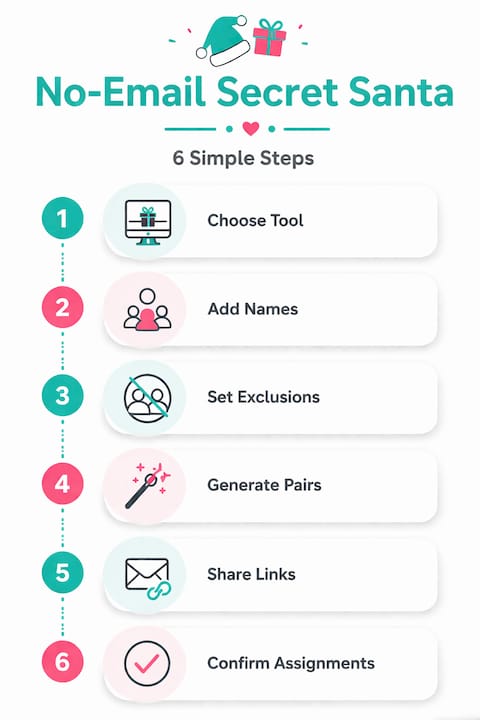
Step 1: Choose your generator. Not all no-email tools are created equal. Drawnames is user-friendly and does not require an account or email, making it a strong starting point for teams that want to move fast. For a broader comparison of your options, reviewing the best Secret Santa apps available in 2026 helps you match features to your group's specific needs.
Step 2: Enter participant names. Open your chosen tool and add every participant's name. Some platforms also let you add a display name or nickname, which is useful for large teams where multiple people share the same first name.
Step 3: Set exclusions if needed. Most tools allow you to block certain pairings. Couples, managers and direct reports, or people who were paired last year can all be excluded from matching each other again.
Step 4: Generate the assignments. Click the generate button. The tool will randomly assign each participant a gift recipient while respecting your exclusion rules.
Step 5: Distribute unique links. Each participant gets a unique link that reveals only their assignment. Copy and paste these links into your team's existing chat channels. No email required.
Step 6: Confirm receipt. Ask each participant to click their link and confirm they can see their assignment. A quick thumbs-up emoji in the group chat is all you need.
| Step | Action | Time required |
|---|---|---|
| 1 | Choose generator | 2 minutes |
| 2 | Enter names | 3 minutes |
| 3 | Set exclusions | 1 minute |
| 4 | Generate assignments | Under 1 minute |
| 5 | Distribute links | 5 minutes |
| 6 | Confirm receipt | Same day |
Pro Tip: Share links in a private one-on-one message rather than a group channel. If you paste all links in a public thread, participants might accidentally see each other's assignments before clicking their own.
For a deeper walkthrough of making the entire process smoother, the stress-free gifting steps guide covers everything from setting timelines to managing last-minute dropouts.
Troubleshooting and common mistakes in no-email Secret Santa setup
Even the best tools can encounter hiccups. Here's how to solve the most common issues that arise with no-email Secret Santa generators.
Problem: A participant can't find their link. This is the most frequent issue. Because no-email tools skip the inbox entirely, links are only as reliable as the channel you used to share them. If someone deletes a Slack message or loses a WhatsApp notification, they're stuck.
Solution: Keep a private record of all generated links in a secure note or spreadsheet that only the organizer can access. When someone loses their link, you can resend it in seconds without regenerating the entire exchange.
Problem: Duplicate assignments. Some basic generators have bugs that create duplicate pairings, where two people are assigned to buy for the same person. Always verify the full assignment list before distributing links.
Solution: Run a quick mental check: if you have 10 participants, you should have exactly 10 unique pairings with no repeats. Most reputable tools handle this automatically, but a 30-second review saves significant headaches.
Problem: Someone drops out after assignments are generated. This happens more than you'd expect, especially in large teams. One person's departure breaks the chain entirely.
Solution: Regenerate assignments for the affected participants only, not the entire group. Some platforms support partial regeneration; others require a full restart. Know your tool's capabilities before launch day.
"The best Secret Santa setup isn't the most feature-rich one. It's the one where every single participant actually completes the exchange."
Privacy is another area where teams sometimes underestimate risk. Uplup is praised for UX but less proven than established platforms, which is a fair observation for any newer tool. Before using any generator in a professional setting, check whether it stores participant names or behavioral data. For workplace exchanges, reviewing your company's HR gift exchange rules ensures you stay compliant with internal policies.
Pro Tip: If your exchange is happening close to the holidays, bookmark a resource on last-minute gifting tips so participants who procrastinate still have solid options. You can also explore apps for Christmas that complement your generator with additional gift inspiration and coordination features.
Comparing no-email Secret Santa generators: Which is best?
Once you've mastered the setup, it's worth knowing which tools deliver the best experience for your group.

Elfster has the most features but requires email and an account, drawnames is user-friendly but has an outdated UI, and Uplup is modern but less proven. Each of these tools occupies a distinct position in the market, and the right choice depends entirely on what your group prioritizes.
| Tool | Email required | Wishlist support | UI quality | Best for |
|---|---|---|---|---|
| Elfster | Yes | Full | Modern | Feature-focused groups |
| Drawnames | No | Basic | Dated | Fast, no-fuss setup |
| Uplup | No | Moderate | Modern | Privacy-focused teams |
Here's a quick breakdown of each tool's ideal use case:
Elfster works best when your group wants a full-featured experience and doesn't mind creating accounts. It supports wishlists, gift suggestions, and even group chat. The tradeoff is that every participant must register, which adds friction and creates a privacy footprint.
Drawnames is the go-to for speed. It's been around long enough to be reliable, and the no-account setup means you can have assignments distributed in under 10 minutes. The interface looks like it was designed in 2012, but it works.
Uplup is the newest of the three and brings a noticeably cleaner experience. It's particularly well-suited for professional teams that care about how tools look and feel. Because it's newer, it has less community feedback, but early reviews are positive.
For teams exploring Secret Santa alternatives beyond these three, or looking for giftgenix alternatives that offer more flexibility, there are several emerging platforms worth evaluating depending on your group's size and preferences.
The honest answer is that no single tool wins for every group. A 6-person friend group has very different needs than a 60-person corporate team. Match the tool to the context, not the other way around.
What most Secret Santa guides miss: The real advantage of no-email generators
Most comparison articles focus on features: wishlists, exclusion rules, reminder notifications. Those things matter. But the real reason no-email generators outperform their inbox-dependent counterparts has nothing to do with features at all.
It's about participation rates.
When you ask someone to click a link in Slack and see their assignment, they do it immediately. When you send them an email with a registration link, you've introduced three potential failure points: the email lands in spam, they forget to check it, or they start the registration process and abandon it halfway through. Every added step is a place where someone drops out of your exchange.
Platform scale versus modern UX is a real tension in this space. Established platforms have credibility and large user bases. Newer tools have cleaner experiences that reduce friction. But neither advantage matters if your participants don't complete the setup.
There's also a professional dimension that most guides gloss over. In a workplace setting, asking colleagues to hand over their email address to a third-party platform creates legitimate privacy concerns. Some employees will refuse. Others will use a personal email, creating confusion about which address to contact. No-email tools sidestep this entirely by never asking for contact information in the first place.
The deeper insight is this: feature bloat is the enemy of fun. The more steps a platform adds, the more it starts to feel like work. Secret Santa is supposed to be joyful and spontaneous. A tool that requires account creation, profile setup, and email verification before anyone can even see their assignment has already undermined the spirit of the event.
Using a Secret Santa wish list workplace guide alongside a simple no-email generator gives you the best of both worlds: structured gift preferences without the overhead of a feature-heavy platform. And if you want to understand how wishlists revolutionize gifting in professional environments, the data is clear: knowing what someone actually wants dramatically increases gift satisfaction for both giver and receiver.
Choose simplicity on purpose. Not because you can't handle complexity, but because your participants shouldn't have to.
Start your stress-free Secret Santa today
You've got the framework. You know which tools to use, how to avoid the most common mistakes, and why simpler is almost always better for group gift exchanges. Now it's time to run an exchange that people actually enjoy from start to finish.
Hop Hey Eneney takes everything you've learned here and builds it into a single, structured platform designed for teams, HR managers, and friend groups. You can create a private celebration page, coordinate gift contributions transparently, and keep the whole thing a surprise, without anyone needing to share their email with a third-party tool. Whether you're organizing a 5-person office exchange or a 50-person company-wide event, Hop Hey Eneney gives you the structure to do it cleanly and the flexibility to do it your way. Set up your exchange in minutes and spend the rest of your energy on what actually matters: finding a gift they'll love.
Frequently asked questions
Can Secret Santa generators really work without email?
Yes, many new tools allow secret assignments using shareable links, removing the need for emails or accounts. Drawnames requires no account or email and is one of the most widely used no-email options available.
Are no-email Secret Santa platforms safe and private?
Platforms like Uplup and drawnames offer enhanced privacy by not collecting email addresses, focusing on speed and ease. No-email link tools offer privacy and speed as their primary advantage over traditional account-based platforms.
What if someone loses their Secret Santa link?
Organizers can resend or recreate links quickly, and most platforms let you recover assignments without email. User-friendly design makes link sharing easy to manage, even when participants misplace their original link.
Do no-email generators support wishlists and preferences?
Some feature-rich tools require accounts for full wishlist functionality, but simpler link-based tools may only handle the assignment itself. Elfster offers the most features but requires an account, while drawnames is user-friendly without one, so the right choice depends on how much structure your group needs.